Wednesday, January 30, 2019

FIFA 14: NEW UPDATE MODDINWAY UNOFFICIAL V5.1 SEASON 2019

NEW UPDATE MODDINWAY UNOFFICIAL V5.1


UPDATE V5.1 WINTER TRANSFERS + STATS

- Fix all Bugs 
- Street Mode 2018-19
- Fashion Tournoment 2019
- New Transfers 27-1-2019
- New Stats acording SOFIFA
- New Faces 2019
- New adboards 2019
- New boots + assignaments 2019
- New Minifaces 2019
- New Gameplay FIFA 19 
New cameras trasmision & cinematicas
- etc 

Recommended requirements: important to have latest moddingway updates until (22.10) is necessary for the update without errors

Thanks for your cooperation  

-Ovide
-iturbe1967
-fifaman017
-Deartz26
nabil27

Link Download:

>> Download <<

Facebook: Pocong Gaming
Youtube: Pocong Gaming
Instagram: @itsfebyao
Twitter: @itsfebyao
Share:

Sunday, January 27, 2019

How to install new season + winter updates 18/19


Tutorial Installation: 

1. NEW UPDATE UNOFFICIAL V1
2. NEW UPDATE UNOFFICIAL V2
3. NEW UPDATE UNOFFICIAL V3
4. NEW UPDATE UNOFFICIAL V4
5. Winter Updates
6. NEW UPDATE UNOFFICIAL V5
7. NEW UPDATE UNOFFICIAL V6
8. New Transfer Updates 23-01-2019

Extract - Copy - Paste to FIFA main folder - Replace ALL ( V1 to V4 & Winter Updates + V5-V6 + New latest transfer )

Last step regen bh with file master

DOWNLOAD LINK:
V1: https://pastebin.com/RZRGCyxp
V2-V6 + Other: https://actualizacionv2fifa14moddinway2019.blogspot.com/

Password for fabipatch mods: fabi7patch2

SUBSCRIBE, LIKE, COMMENT AND SHARE..

DONT FORGET TO #SUBSCRIBE #SHARE #LIKE #COMMENT & HIT THE BELL ICON

PLZ HELP ME TO REACH 2K SUBSCRIBERS GUYZ....

COMMENT BELOW WHAT U GUYZ WANT TO SEE IN MY NEXT VIDEO..

THANK YOU FOR SUPPORTING ME..

Tutorial Youtube: https://youtu.be/yvTcoi0Eqfk

Facebook: Modding14
Instagram: @itsfebyao
Twitter: @itsfebyao
Youtube: Pocong Gaming
Share:

Monday, November 26, 2018

How to Install Mods FIFA 14 season 18/19

How to install mods fifa 14 season 18/19

1. U need first mod, FI XIV ModdingWay Mod Update 17.5.0 - AIO 
( Important mods must installed on your fifa 14 folder )


2. Extract folder, and copy to you fifa folder installation
Ex : C:\FIFA 14 ( every people have different fifa 14 folder installation )

3. Run ModdingWayInstaller ( Run as Admin ), Click Install & wait for a minute. ( its need a few minute for installing, Click ok when pops up show )

4. Do the same with other mods versions, should be sequential in accordance with the mods version
Follow this step : 

a. FI XIV ModdingWay Mod Update 18.0.1 ( Extract folder, and copy to you fifa folder installation,Run ModdingWayInstaller ( Run as Admin ), Click Install & wait for a minute. )
b. FI XIV ModdingWay Mod Update 19.0.0 ( Extract folder, and copy to you fifa folder installation,Run ModdingWayInstaller ( Run as Admin ), Click Install & wait for a minute. )
c. FI XIV ModdingWay Mod Update 20.0.0 ( Extract folder, and copy to you fifa folder installation,Run ModdingWayInstaller ( Run as Admin ), Click Install & wait for a minute. )
d. FI XIV ModdingWay Mod Update 21.0.1 ( Extract folder, and copy to you fifa folder installation,Run ModdingWayInstaller ( Run as Admin ), Click Install & wait for a minute. )
e.  FI XIV ModdingWay Mod Update 22.0.0 ( Extract folder, and copy to you fifa folder installation,Run ModdingWayInstaller ( Run as Admin ), Click Install & wait for a minute. )
f.  FI XIV ModdingWay Mod Update 22.1.0 ( Extract folder, and copy to you fifa folder installation,Run ModdingWayInstaller ( Run as Admin ), Click Install & wait for a minute. )

5. After u completed finish installing mod, go to FIFA 14 folder installation ( my folder installation on C:\FIFA 14 )

Follow this step : 
a. Run as FIFA 14 MWM Selector ( run as admin )
b. Select Database, choose Database 14.0 ( this is a new version DB 15.0 Season 17/18 ), Click Apply Database
c. If u found green pops up on boots menu, Click Update ( that will update a new boots )
d. If u want High Quality Kits, checklist that bar
e. EA Update Manager, Choose EA Update Disable and Click apply.

Unoficial  update but this is a real season 18-19 with other mods. 

g.  NEW UPDATE UNOFICIAL V1 MODDINWAY SEASON 18-19 FIFA 14 ( Extract folder, and copy to you fifa folder installation, Run FileMaster ( Run as Admin ), Click browse > fifa folder > click ok
> click on top left side > Regenerate Bh ( wait a minute & close filemaster after finish )
h.  FIFA 19 SLIDERS CAMERA MOD REALIST PS4 FOR FIFA 14 ( Extract folder, and copy to you fifa folder installation, Run FileMaster ( Run as Admin ), Click browse > fifa folder > click ok
> click on top left side > Regenerate Bh ( wait a minute & close filemaster after finish )
i. REAL GAMEPLAY FIFA 19 V8 FOR FIFA 14 ( Extract folder, and copy to you fifa folder installation, Run FileMaster ( Run as Admin ), Click browse > fifa folder > click ok
> click on top left side > Regenerate Bh ( wait a minute & close filemaster after finish )
j. MOD REAL EXPERIENCE V1 SEASON 2019   FIFA 19 GRAPHICS FOR FIFA 14 ( Extract folder, and copy to you fifa folder installation, Run FileMaster ( Run as Admin ), Click browse > fifa folder > click ok > click on top left side > Regenerate Bh ( wait a minute & close filemaster after finish )
k. NEW UPDATE UNOFICIAL V2 MODDINWAY SEASON 18-19 FIFA 14 ( Extract folder, and copy to you fifa folder installation, Run FileMaster ( Run as Admin ), Click browse > fifa folder > click ok > click on top left side > Regenerate Bh ( wait a minute & close filemaster after finish )

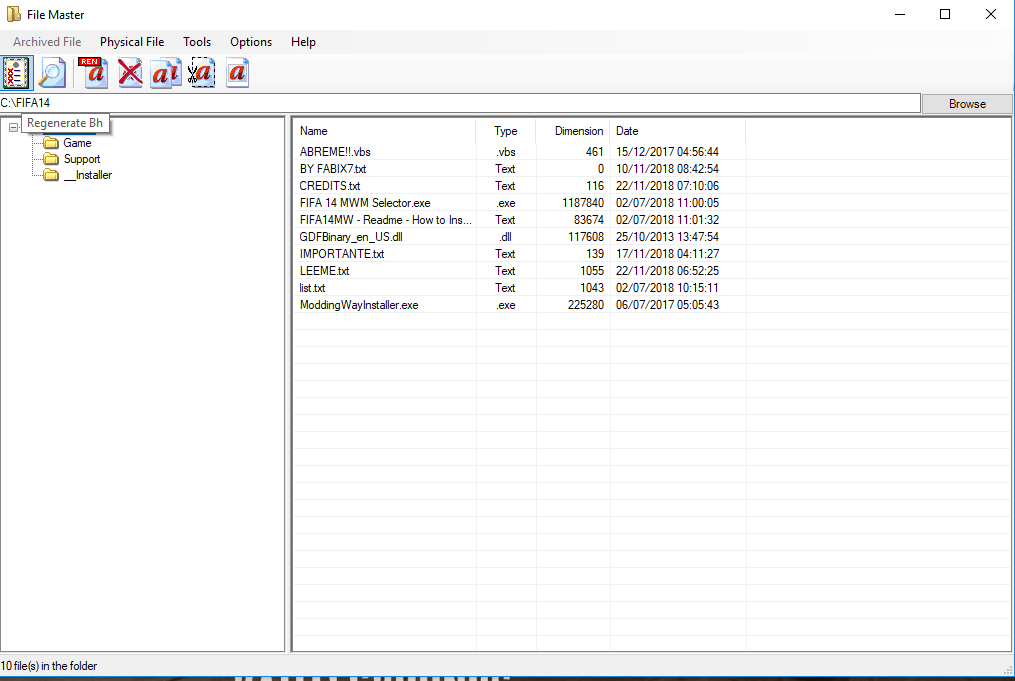
Example Image Tools:
FileMaster browse your fifa folder

Click Regenerate Bh & wait until finish ( its take a minute )

6. Now u already finish installing FIFA 14 with new season 18/19 + gameplay fifa 19 mods, etc.

Note ( Important ) :
If u dont follow step by step, you will get error or crash on fifa 14 games. so carefully and follow step by step.

7. IF u have problem, feel to free to comment with u problem on my pages.

Link Moddingway: ( a until f step )

Link fabipatch: ( g until k step )
NEW UPDATE UNOFICIAL V1 MODDINWAY SEASON 18-19 FIFA 14: Download
FIFA 19 SLIDERS CAMERA MOD REALIST PS4 FOR FIFA 14: Download
REAL GAMEPLAY FIFA 19 V8 FOR FIFA 14: Download
MOD REAL EXPERIENCE V1 SEASON 2019   FIFA 19 GRAPHICS FOR FIFA 14: Download
NEW UPDATE UNOFICIAL V2 MODDINWAY SEASON 18-19 FIFA 14: Download

Password for fabipatch mods: fabi7patch2
Share:

Tuesday, June 12, 2018

FIFA 14 Commentary File

FIFA 14 All Commentary Languages


Link Download

Arabic : Not Work

Czech : Download

Dutch : Download

Italian : Download

French : Download

Spanish : Download

Russian : Download

Polish : Download

Follow this tutorial on below:

This patch will add the commentaries to your FIFA 14. 

Installation: 
1. Unzip to Origin Games/FIFA 14/Game folder 
2. Accept when asked to overwrite files 
3. Start Origin, click on the FIFA 14 cover and select Repair Install 
4. Start FIFA 14 and select the commentaries in game settings

Other method installation:
1. Unzip to xxx/FIFA 14/Game
2. Accept when asked to overwite files
3. Go to list.txt at xxx/FIFA14 & edit list.txt
4. Example  Russian & Spanish ( Idk with other languages method ) : 
  • rus_ru
  • rus_ru
  • russian_ru
  • russian_ru
  • spa_es
  • spa_es
  • spain_es
  • spain_es

5. Copy & paste to list.txt
6. Run as admin ModdingWay Installer
7. Done, you can go to in game settings and choose the commentaries

*Russian & Spanish its tested and working fine at me.
Share:

Final Scoreboard FIFA 18 for FIFA 14

Scoreboard FIFA 18 for FIFA 14 by DJEYNER70


I will give you step by step to installing this scoreboard FIFA 18 for FIFA 14 at you PC. Just follow tutorial on bellow for make it works at you PC. Already tested this modd and all its work fine not crash/forced closed problem.
  • Download modd Scoreboard FIFA 18 for FIFA 14 PC on bottom post download
  • Extract file, then copy overlays folder


  • Paste folder to xxx\FIFA 14\Game\data\ui\game ( Overwite all )

  • Run as admin File Master, click browse > FIFA 14 folder > regenerate BH
  • Features: Graphic changed, Pointer changed ( if you used keyboard/joystick ), new scoreboard from top league, and pop up changed too, etc 

This scoreboard its created by DJEYNER70, if you want support him just click on the link to go to his channel Youtube

Link Download

Final Scoreboard : Mediafire
Share:

Important BackUp File Before Using Creation Master

Important BackUp File


Did you want try modd you're FIFA 14, before you start it. Recommended backup file fifa 14. If you dont want losing you data, carrer mode, etc. Because it will remove all previous database.
You can backup all FIFA 14 folder but its take a big size for you drive or you can choose just important backup file.

If you edit FIFA 14 with creation master and you just want edit database players, teams, logo. You just need backup db folder & loc folder, both folder if you dont backup. Prepare to install at first time again you're FIFA 14. I re-installed many times my FIFA 14 games because dont backup important file.

The best choice is you backup FIFA 14 games folder, but its take a long times and space for you're drive. Its back for what you need, you can choose all backup or just db/loc folder.
Before try modding with all FIFA 14 tools, u need to backup all important file first.
Share:
Copyright © FIFA 14 Mod | Powered by Blogger Design by ronangelo | Blogger Theme by NewBloggerThemes.com